


Say the destination.
No need to know what a website calls its menus. Start with what you came to do, in your own words, and correct the request along the way.
ILUNỌNSEN PRODUCT / WORKING PREVIEW

Tell Tholi where you want to go. Follow a clear next step, right on the website. You make the clicks. Tholi keeps the destination in view and checks the result.
Desktop Chromium & Firefox · English
Local processing. No account required.
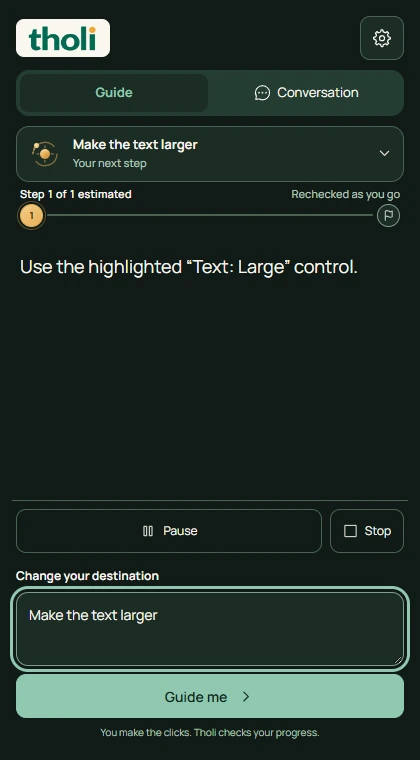 REAL THOLI INTERFACE / GUIDE
01 / THE REAL PRODUCT
You know where you want to go. The next click should feel obvious. Watch the real Tholi extension guide a text-size change on Wikipedia.
Actual extension recording. You make the clicks. Tholi checks the requested result.
A little breath before the next destination.
Brand-motion demonstration. These states are illustrative, not a live navigation result.
02 / THE THINKING
The web has a lot of doors. Tholi helps you find the one you came for, while leaving the mouse in your hands.
The amber point in our wordmark is a small companion with a purpose. It waits, finds a path, asks for a moment and acknowledges arrival.
THE DESTINATION STAYS WITH YOU
Menus open. Pages change. Sign-in gets in the way. Tholi retains your request and looks for fresh evidence on each screen.
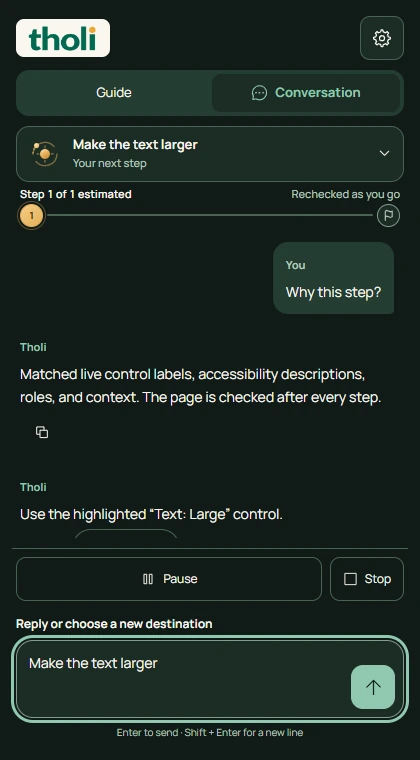
Guide keeps the next action concise. Conversation keeps the request, corrections and route explanations together. Switching views keeps the same journey.
03 / GET THOLI
Choose the desktop Chromium or Firefox preview. No account needed.
A helpful guide. An honest preview. Some dashboards and longer workflows remain unreliable. Explore current setup, compatibility and limitations on Tholi’s website.
04 / THE EXPERIENCE
No need to know what a website calls its menus. Start with what you came to do, in your own words, and correct the request along the way.
Tholi looks at the available interface. A grounded instruction and a highlight help you find the right control.
You stay in control. Tholi watches for the requested result before it calls the journey complete.
Navigation, language processing and visual assistance run on your device. No required cloud model or background upload service.